I’m having an issue where all of my Stripe configuration options are missing. It has disabled all of the forms on my site as well.
Is anybody else having this issue?
Joe
I’m having an issue where all of my Stripe configuration options are missing. It has disabled all of the forms on my site as well.
Is anybody else having this issue?
Joe
Mine looks normal. Which versions of the plugin (base and pro, numbers are sometimes different, ideally you’d want them to match) are you using?
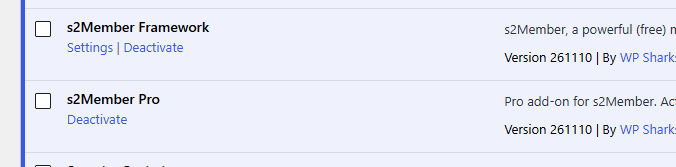
They are both the same.
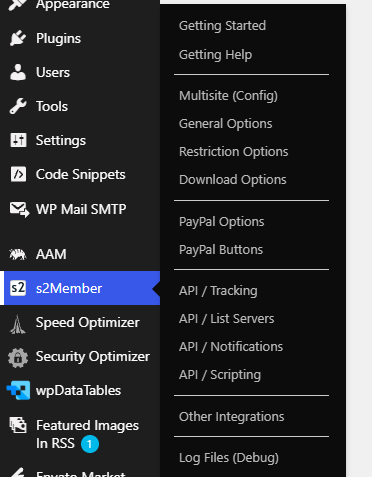
Here is a screenshot of my menu options for s2Member and the plugin page with the version numbers
Maybe try going directly to the Stripe options page and pro-forms pages with
/wp-admin/admin.php?page=ws-plugin–s2member-pro-stripe-ops
/wp-admin/admin.php?page=ws-plugin–s2member-pro-stripe-forms
Personally I’d disable and enable all s2 plugins and see what happens, it looks like Pro isn’t loading.
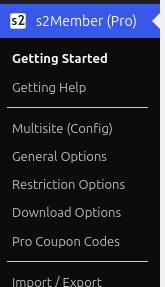
You seem to have s2Member Pro disabled. The menu entry would say s2Member (Pro) and have Pro entries like the Coupon Codes and Import/Export, but yours looks like just the Framework.
I’m not sure why Pro wouldn’t be active for you, I don’t see a problem with the version you have…
The only thing that comes to mind is an incomplete upload… Maybe some file is missing in your isntallation. Try installing again s2Member Pro and see if that fixes it.
I hope that helps.

I did try the direct URLs to the pages that did not work.
I have also tried to reinstall pro. Should I uninstall it completely first? I do get prompted to re-enter my pro username and license code on every new version now. Is it possible I entered incorrect data and it is now broken?
Joe
I also disabled and reactivated both plugins as well. Nothing I’m still blocked from the pro options
Hmm… That’s weird.
The activation for s2Member Pro in the Plugins Manager is not really true. s2Member Pro should activate automatically when the right conditions are met, and these are checked in the pro-module.php file.
There seems to be something odd going on in your setup.
If you haven’t yet, please eanble WP_DEBUG, try s2Member Pro in WP Admin again, and see if you get any entries about it in the debug.log. Debugging in WordPress – Advanced Administration Handbook | Developer.WordPress.org
If you want, I can take a look myself, and see if I can figure out what’s going on. I’d need wp-admin and FTP access, you can send them in a private message or email.
I have to enter the license activation code after each update. 
Even if using ftp or uploading the plugin via Wordpress, manually.
No, the license hasn’t been used for activation so far, only to download a Pro update with the built-in Pro upgrader.
yes I have manually uploaded the plugin after downloading it from my account page.
So you’re saying my pro isn’t activated yet. Maybe I did type something in wrong when trying to reactivate it. Is there somewhere for me to enter that in again? I’ve looked in all the menus and can’t find anything.
It is active now. Check the email I sent you.

Thank you. I have replied via email too.