Paypal IPN 403 error

Hi.

Paypal transaction are updating memberships but Paypal IPN history says “retrying” for 16 retries (around 24 hours) then fails. I am getting daily emails from Paypal saying “warning IPN error”

“IPNs sent to the following URL(s) failed:
https://domain.com/?s2member_paypal_notify=1
If this problem continues, IPNs may be disabled for your account.”

I can access https://domain.com/?s2member_paypal_notify=1 in browser and via server CURL, its working.

I have
-disabled cloudflare
-disabled wordfence and removed WAF from htaccess
-double checked htaccess, its standard
-double checked virtual host, its standard
-disabled mod_security
-disabled mod_cloudflare
-disabled mod_remoteip

there is no proxy in place.

Apache access.log show all Paypal IPs get 403 errors.
173.0.81.140 - - [22/Mar/2026:07:11:34 +0000] “POST /?s2member_paypal_notify=1 HTTP/1.1” 403 114 “-” “PayPal IPN ( https://www.paypal.com/ipn )”
173.0.81.65 - - [22/Mar/2026:07:11:36 +0000] “POST /?s2member_paypal_notify=1 HTTP/1.1” 403 114 “-” “PayPal IPN ( https://www.paypal.com/ipn )”

Error Log debug is showing request gets to PHP.
ChatGPT Summary after pasting logs,

  • Request reaches PHP : That’s where s2Member or a security plugin could generate a 403 response.
    Conclusion:
    The 403 you saw for PayPal IPN is coming from PHP or a WordPress plugin , not Apache or SSL.

There are no security plugins or anything enabled that can generate 403.

Does anybody have any idea please anything in s2member which could be causing this?

There is nothing left that can cause this. No weird rewrite rules in httpd.conf

Thank you

Cloud flare? Make sure to deactivate any of their speedup options. Shared hosting or webhosting? Make sure to go dedicated server.

1 Like

That also makes me think of this article: https://s2member.com/kb-article/mod-security-odd-403-503-500-errors/

I added added a bit more detail to the logs, maybe it’ll help troubleshoot it. Try this zip s2member-v260322.2313.zip (1.4 MB) WP Admin > Plugins > Add New > Upload

See if you can reproduce the problem, maybe resending one of those problem IPNs, and get the core-gateway-ipn.log entries for it.

Let me know how it goes.

:slight_smile:

Thanks for the reply.

All Paypal details are correct, merchant, API username, password and secret

I installed another membership plugin for testing and their IPN works fine (https://domain.com/wp-admin/admin-ajax.php?action=ipnhandler). But I dont want to use them, but just to know IPN can work on this server

Here is 1 failed s2 log entry for a failed IPN listed on Paypal

LOG ENTRY: Tue Mar 17th, 2026 @ precisely 4:42 pm UTC
PHP v8.3.8 :: WordPress v6.9.4 :: s2Member v260301 :: s2Member Pro v260301
Memory 80.76 MB :: Real Memory 82.00 MB :: Peak Memory 80.82 MB :: Real Peak Memory 86.00 MB
domain.com/?s2member_paypal_notify=1
User-Agent: s2Member v260301; https://domain.com
Array
(
[txn_type] => web_accept
[txn_id] => 12345678
[custom] => domain.com
[mc_gross] => 5.00
[mc_currency] => GBP
[tax] => 0.00
[payer_email] => customer@outlook.com
[first_name] => customer
[last_name] => smith
[option_name1] => Referencing Customer ID
[option_selection1] => 113
[option_name2] => Customer IP Address
[option_selection2] => 2a02::3aa8:c1e0:6d37
[item_name] => domain.com - 1 month subscription
[item_number] => 2::1 M
[option_name] => Referencing Customer ID
[option_selection] => 113
[proxy_verified] => paypal
[s2member_log] => Array
(
[0] => IPN received on: Tue Mar 17, 2026 4:42:32 pm UTC
[1] => s2Member POST vars verified with a Proxy Key
[2] => s2Member originating domain ($_SERVER["HTTP_HOST"]) validated.
[3] => s2Member txn_type identified as ( web_accept|subscr_signup ).
[4] => s2Member txn_type identified as ( web_accept|subscr_signup ) w/ update vars.
[5] => Automatic EOT (End Of Term) Time set to: Fri Apr 17, 2026 4:42:32 pm UTC.
[6] => s2Member Level/Capabilities updated w/ advanced update routines.
[7] => Modification Confirmation Email sent to: “customer” customer@outlook.com.
[8] => User exists. Handling payment for Subscription via ( web_accept ).
[9] => Storing IPN signup vars now. These are associated with a User’s account record; for future reference.
)

[subscr_gateway] => paypal
[subscr_id] => 12345678
[subscr_baid] => 12345678
[subscr_cid] => 12345678
[level] => 2
[ccaps] => 
[eotper] => 1 M
[ip] => 2a02:8428:8e:352:8d2a
[period1] => 0 D
[mc_amount1] => 0.00
[period3] => 1 M
[mc_amount3] => 5.00
[initial_term] => 0 D
[initial] => 5.00
[regular] => 5.00
[regular_term] => 1 M
[recurring] => 0
[currency] => GBP
[currency_symbol] => £
[s2member_paypal_proxy] => paypal
[s2member_paypal_proxy_use] => pro-emails
[s2member_paypal_proxy_coupon] => Array
    (
        [coupon_code] => 
        [full_coupon_code] => 
        [affiliate_id] => 
    )

[s2member_paypal_proxy_verification] => 917912a28812665b8f6ad2cbbc95602a

)

another time one member saw this after payment and account was not updated, im guessing its related:

Centos 7.9 (yes I know it needs replacing)
but PHP is up to date - 8.3.8

Thank you

You need to disable the post cars verification for the later problem. That’s unrelated however to your original problem I think

1 Like

Thanks for the extra detail.

Since the request is apparently reaching PHP, but PayPal is still reporting repeated 403s, I think the next step is to get the relevant s2Member logs all together and review them as a set.

Can you please send me these log files after another PayPal payment/IPN attempt?

  • s2-http-api-debug.log
  • wp-http-api-debug.log
  • core-gateway-ipn.log
  • core-gateway-rtn.log

That should let me see what s2Member is logging around the core IPN flow, what it is logging around the return/verification flow, and whether there are any HTTP-level errors/timeouts/SSL issues showing up in the HTTP API debug logs.

If any of those logs are currently disabled/empty, please enable the relevant logging options first, run one more test payment, then send the log files privately so i can study them.

:slight_smile:

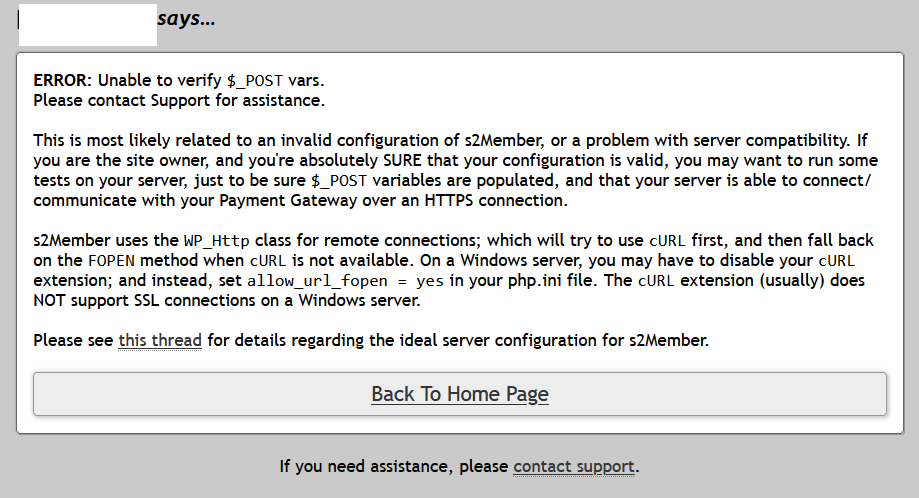
another time one member saw this after payment and account was not updated, im guessing its related

What Felix suggested may help with that POST vars error. Worth a try. WP Admin > s2Member > PayPal Options > PayPal IPN Integration > Enable Fallback for Missing User “IPN Signup Vars”

Are you getting that often, all the time, rarely? The core-gateway-rtn.log may help get more detail about it if you reproduce it, or tell me how to identify that particular one from the screenshot in your log (e.g. user email, txn_id, or subscr ID)

:slight_smile:

“unable to post vars” error seems to display if I use Paypal buttons but,
never mind about that now as Ive switched back to pro-forms and “Custom Return URLs Upon Success”. (I changed to buttons temporarily to see if IPN error still occurred and it does)

“Enable fallback behavior” hasnt helped unfortunately.

Thanks for looking in to this, I’ll send logs now

1 Like

according to this, somebody is of the opinion to ignore the Paypal IPN warnings.

So even if Paypal disabled IPN, do I need it? As maybe S2member set the membership via PDT?

Thanks

Thanks for the updates.

So if you use the pro-form you don’t have the issue, and it’s only with the buttons? I’m guessing you use the legacy buttons powered by PayPal Standard, right? If so, I’d recommend you try switching to the new PayPal Checkout ones, which don’t even use IPNs, that integration receives the newer webhooks. WP admin > s2Member > PayPal Options > PayPal Checkout

Please let me know if you try them and how it goes. I look forward to your update.

:slight_smile:

IPN still fails at Paypal’s end with pro-forms but the membership is updated fine and the user doesnt see the post_vars error on return to website,
but that doesnt matter now if IPN is being deprecated.

Thanks for the tip, I didnt consider Paypal Checkout as its says Beta. I’ve enabled this now.

"PayPal Button shortcodes are powered by PayPal Checkout without requiring shortcode edits. "

Does this include pro-forms (not requiring any changes to existing pro-forms on website front end)?

Thank you

1 Like

The PayPal Checkout applies only to the PayPal button shortcode, not the pro-form yet.

It’s good that you try it out. I’m taking it out of beta very soon, and deprecating the legacy ones.

But the existing legacy subscriptions may keep sending IPNs to your endpoint, so don’t disable that, and keep s2 logging enabled while we still troubleshoot this.

Did the PayPal Checkout payment cause an IPN from PayPal, or a webhook?

The logs and your reports show two separate issues, one with the return, and another with the notifications.

The return one, from the logs, points to a misconfigured PDT Identity Token. Please get your live PDT Identity Token from PayPal again, paste it in the s2Member field for it, and save.

About the IPN endpoint 403’s, I checked the endpoint itself with a GET request and right now it responds with: “This PayPal IPN Handler by s2Member® is active & listening.” No 403… but that is not the same as a real PayPal POST. I did a POST request and got a 200, no error.

The 403 to PayPal’s IPN is not being returned by s2Member. You say you don’t have a security plugin, so I’d look at the server, or the CloudFlare proxy…

The most useful next thing may be the web server access/error log lines, and if possible any Cloudflare security/event log entries too, for one of the exact PayPal IPN failure times. That should tell us more directly where the 403 is really coming from.

:slight_smile:

unfortunately since around 12 hours ago so my server has been compromised and somebody hijacked / changed my Paypal account details within s2member and has received payments to their account instead of mine!

So I will get back to you about this IPN issue as it is not priority.

I did disable Wordfence and might have changed file permissions too relaxed when experimenting and forgot to put it back :grimacing:

I cant be the first person who this has affected so I wonder if s2member could have security option to tamper-proof / lock settings… I guess depends what access the hacker has as maybe they could override this :confused:

Oh! I’m so sorry that happened :frowning:

I hope you can sort it out without much trouble.

I’d also remove from PayPal the NVP credentials you were using! change them for new ones, the old ones are compromised. Same for any other API/credentials you had configured in your site, including the wp-config.php ones.

And use chatgpt or some other AI to guide you through securing the site, find his access point and remove/patch it, auditing the site for any security issues (including any the attacker left hidden, e.g. accounts, files, database, etc), clean it all up, etc.

I cant be the first person who this has affected so I wonder if s2member could have security option to tamper-proof / lock settings… I guess depends what access the hacker has as maybe they could override this :confused:

They’d just bypass it if they have admin or server access…

:confused:

yes thanks I used chatgpt, it had more ideas for securing it, other than my own.
And ive enabled wordfence, it did a scan and found loads of files and folders which didnt belong!
Also luckily I found new admin accounts they created!
I will never ignore wordfence notification emails again (they send a lot - and with many websites, I’d ignored the emails for years…oops)

Id forgot to re-enable WF for days after troubleshooting. Also…I was still using ezphp plugin which has been deprecated for years :grin:

I’ll get back to this IPN thing in a few days thanks, I need a break for now :smile:

1 Like

:sweat_smile::grin: