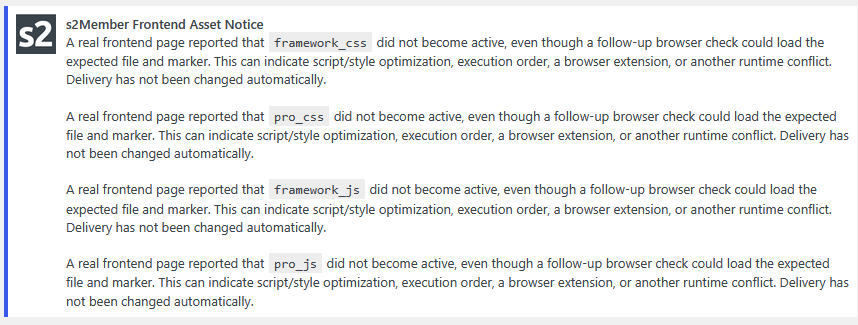
New caching issues "A real frontend page reported that"

On updating to the new v260909 I’m now presented with a notice on every admin page load and I can’t dismiss the notice.

Each notice ends by saying “Delivery has not been changed automatically” so if that is the default behaviour from now on the notice should be dismissible rather permanent on each page load.

Also I want to optimise for peak performance wrt caching so any advice would be appreciated.

I can commend out line 97 in s2member/src/includes/hooks.inc.php

add_action('admin_notices', 'c_ws_plugin__s2member_utils_assets::static_assets_admin_notice');

And that will stop the notices appearing but its a workaround rather than a fix.

After activating the new options regarding opimiziation, minify js and so on - I see them too in my dasboard.
But I don’t really know what it means or what I should do.

Thanks for reporting this, and sorry for the inconvenience. :pray:

That notice comes from a new CSS/JS health check I added in this release. The idea is to catch cases where s2Member’s frontend files are present and reachable, but for some reason they don’t actually become active on the page. That can be important with things like Pro-Forms, where missing or delayed JavaScript can leave the form not working correctly.

The check currently runs about 1 second after the page has finished loading. I chose a short delay because, if the JavaScript really failed, I wanted s2Member to notice and recover quickly instead of leaving a broken form sitting there. I thought that waiting until after the page had loaded was already late enough, and that I could catch the issue without making the visitor wait longer and possibly leave.

What seems to be happening here is that some caching/performance setups intentionally delay or reorder JavaScript execution. In that case s2Member checks after 1 second, doesn’t see its completion marker yet, and reports the warning. A follow-up check from the admin area can still load the file and see that the expected code is there, which is why the notice says that delivery was not changed automatically.

This behavior didn’t happen in the test setups I used before the release, so I’m looking at it now based on your reports.

I’m improving a few things here: the wording of the notice, making this type of warning dismissible, and the runtime-check behavior itself. I’m also considering adding a setting for the marker-check delay, so sites that intentionally delay JavaScript can adjust it for their setup.

I’ll likely have a maintenance release for this later today or tomorrow.

In the meantime, if you keep logging enabled, it can give us a few more details if this happens again. WP Admin > s2Member > Log Files

About what settings to use, I prefer the static assets, combined and minified, but I added options so site owners can pick and choose what works best for their setup. I’ll see if I can add a little more description there too, so it’s easier to decide.

:slight_smile:

1 Like

That’s great Christian and quite sensible sounding.

As I’m sure you know caching is, and has always been, a bit of an art rather than a science and usually takes a bit of experimentation to make sure a site is performant with effective caching. It’d be really useful to have a list of the the cached files being being effected displayed somewhere, to make debugging more straightforward.

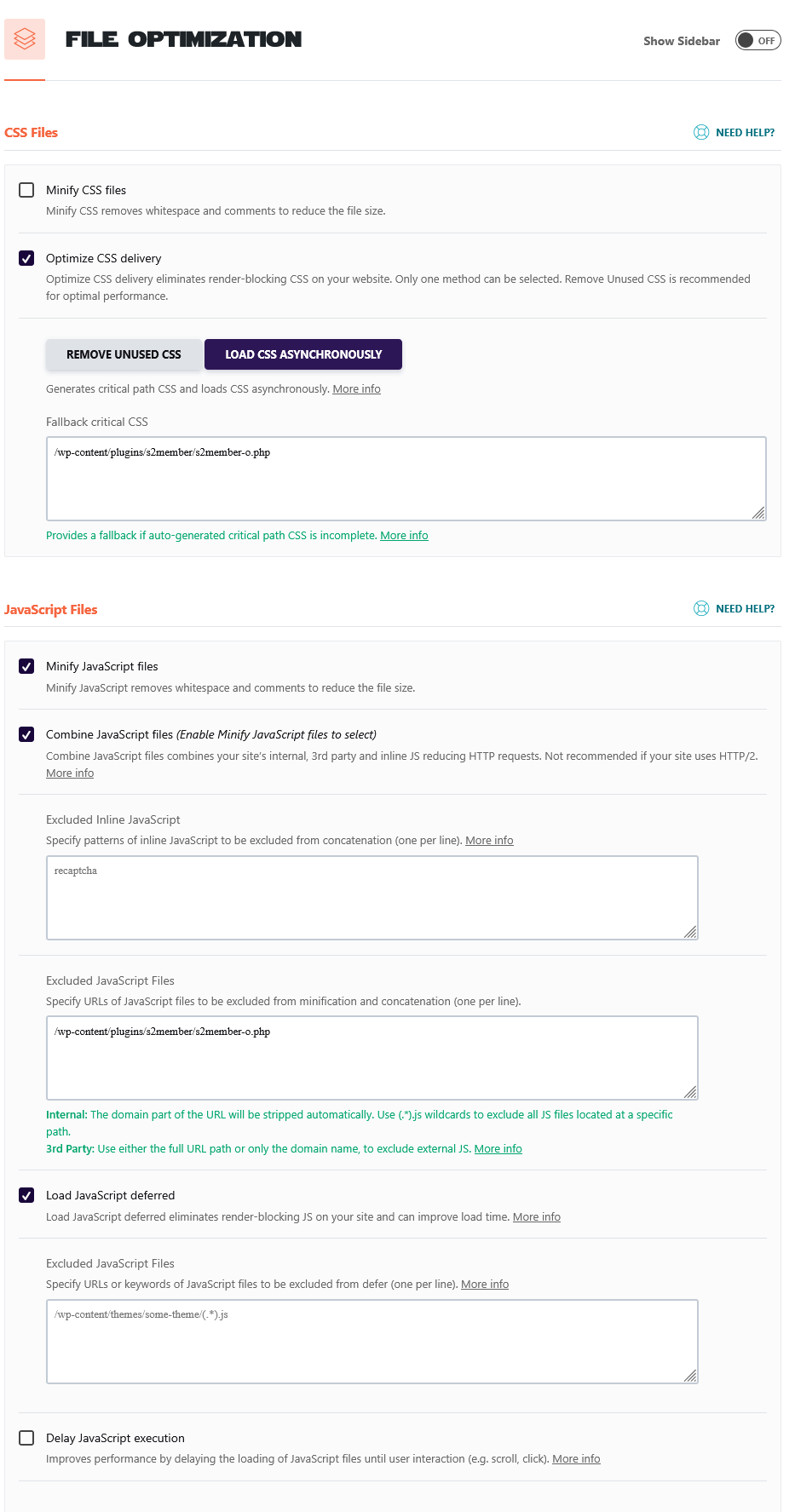
FWIW I’ve my own preferred caching plugin, WP Rocket, configured with the following settings making an exception of /wp-content/plugins/s2member/s2member-o.php.

I’ve added the following to my function.php rather than hack s2member files directly

add_action('admin_init', 'remove_s2member_static_assets_admin_notice');

function remove_s2member_static_assets_admin_notice() {
    remove_action(
        'admin_notices',
        'c_ws_plugin__s2member_utils_assets::static_assets_admin_notice'
    );
}

this stops the hook on line 97 in s2member/src/includes/hooks.inc.php from running.

add_action('admin_notices', 'c_ws_plugin__s2member_utils_assets::static_assets_admin_notice');

1 Like

An art indeed! :sweat_smile:

I haven’t used WP Rocket myself, but I hear very good things about it.

The exclusion you have for /wp-content/plugins/s2member/s2member-o.php applies to s2Member’s dynamic CSS/JS loader. The new static files are under /wp-content/uploads/s2member-assets/, and those are intentionally designed to be cacheable, so I wouldn’t exclude them from caching.

Caching is perfectly fine for those files. That was really the point of most of the refactor I did in this area: make s2Member’s frontend CSS/JS properly cacheable.

The dynamic values that can change with the current user are no longer built into those asset files. I moved those out and now add them inline with the WordPress page being served. That way the static CSS/JS files don’t contain those non-cacheable values, which is safer and also lets browsers reuse the same files much more effectively, even for logged-in users.

Looking at your WP Rocket settings, I notice that “Delay JavaScript execution” is disabled, so that particular feature doesn’t seem to be the cause here.

You do have JavaScript combining and deferred loading enabled, though, and “Load CSS Asynchronously” too. Those can change when and where the CSS/JS actually becomes active on the page. That could explain why s2Member’s 1-second runtime check didn’t see its completion markers even though the files themselves were fine when checked afterwards.

If we need to troubleshoot this further before I release the adjustment, one useful test would be to temporarily exclude the s2Member files under /wp-content/uploads/s2member-assets/ from WP Rocket’s CSS/JS optimization processing and see whether the notice stops. I wouldn’t consider that a permanent requirement, though. The goal is for s2Member to work well with normal caching/optimization setups without needing special exclusions.

And yes, moving your workaround into a WordPress hook/filter hack like that is much better than editing the s2Member plugin files directly, since it won’t be overwritten by an update.

That hack is fine for now if the repeated notice is getting in the way. Just keep in mind that it suppresses the whole s2Member frontend-asset notice system, including notices for real delivery problems where the automatic fallback/recovery information could be useful.

Once I release the adjustment, I’d remove that hack again. I’m changing this particular runtime warning so it behaves more appropriately, without losing the useful notices for actual asset failures.

I added those notices/warnings for a few different scenarios so problems would become obvious sooner, and I also added fallback/recovery measures to try to keep things working when something is not right.

I couldn’t list every detail in the changelog, but I tried to give the general idea. I really did try to think through as many situations as possible, but I didn’t expect the behavior you came across. I thought that checking after the page had finished loading was already late enough to make sure s2Member’s CSS/JS were active, while still catching a real failure quickly enough that a visitor wouldn’t be left looking at a broken Pro-Form.

I’m glad you mentioned the notices and your WP Rocket setup, because it gives me a real-world case to improve this against.

I’ll try to have a follow-up release with an improvement for this today, trying to avoid other site owners from also getting those notices in similar setups. In the meantime, with logging enabled, if it happens again, we can look at more details in s2Member’s css-js.log file.


:slight_smile:

1 Like

Quickly: Disabling WP Rocket made no difference to the " A real frontend page reported" messages appearing. AFAIK WP Rocket makes no difference to admin assets loading, in my experience at least.

1 Like

For the monitor that checks on the page if the s2Member assets loaded, I didn’t want to just change the wait to make it longer, I also added a new option so you can adjust it to your setup. The default in the last release was to wait 1 second after the page finished loading, I now changed it to 3 seconds hoping it’ll be enough, but you can make it wait longer. WP Admin > s2Member > General Options > Static CSS/JS Optimization (beta) > Wait Before Checking Frontend Assets (in seconds)

Please let me know if the 3 seconds wait solves the “late” status for it on your setup, or if you had to adjust it? In case I need to change the default… But in any case, the monitoring system is smarter now, and won’t show that notice.

I also prepared a health status panel for the CSS/JS assets, similar to the one I built for the EOT behabvior and reminders before. It took me a while to get the logic right for each status, and for when to show an admin notice, but I’m happy with it now. I’ll make the release later today, but here’s the file if you want to try it before:

s2member-dev-v260911.0656.zip (1.6 MB)

I look forward to your update. I hope it resolves that for you.

:slight_smile:

3 Likes

Awesome! :partying_face:

2 Likes

That seems to have resolved any issues but then my sites are unusually quiet today.

I’ve set the new Static CSS/JS generation and minification and can already see a slight speed up on my signup pages.

I’ll run some benchmarks later to see if its real or just psychosomatic on my part :rofl::+1:

1 Like

I know what you mean! I also had to measure and confirm it wasn’t just placebo! :joy:

I’m glad it seems fine and there’s no notice for you now. I look forward to your update after you inspect it closer, and also later when you had it going for a while, too.

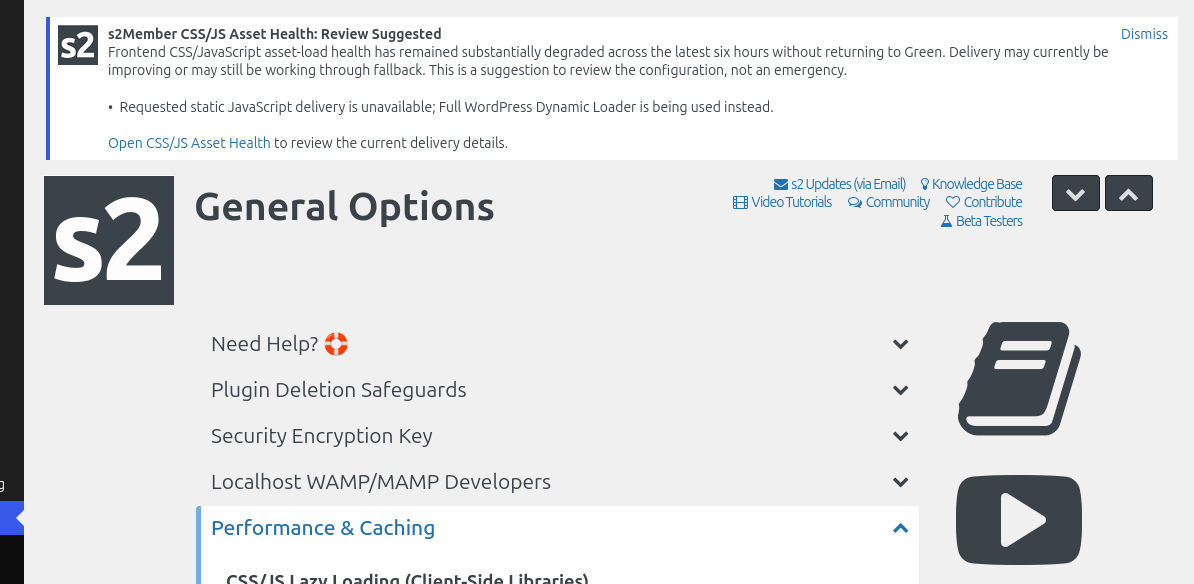
I removed one of my generated js files in a test, and waited a few hours to see the new notice behavior, and I can show you what it’d look like (this is the replacement of the impatient one you were getting):

Althought I’m adjusting it a bit more before the release, e.g.:

I’m not sure it’s faster. But I’ve always used CSS and js minify, merging and compression with 3rd party plugins. It surely isn’t slower.

3rd party benchmark is the same time, but maybe for logged in users it’s faster.

2 Likes

Depending how you optimize you won’t feel a difference. I use autoptimize and I need to add some exclusions for both java and css or it will use the fallback.

:innocent:

1 Like
  • (Framework) Fix: Made frontend CSS/JavaScript monitoring less impatient on sites where expected assets take a little longer to become active. Although the monitor already waited until the page had fully loaded before checking, some setups make their CSS/JavaScript become active a little later, which could cause a false alarm. This has now been fixed. Thanks to Gerard for reporting this. See: thread #13609

:slight_smile:

1 Like

Correct. Logged in users would notice it more, because that normally wouldn’t have been cached the same way as for guests. Now logged in users can also benefit from s2Member’s cached assets.

:slight_smile:

1 Like