Free registration register page?

I know this would seem an obvious question but I guess I’m going to need some guidance. I’m building a site that is going to be a combination blog / forum. I want 1st time visitors to land on an introductory page where they can navigate to other pages to get a taste of the site. So the first page needs to be something other than a login page, especially if they are new and don’t have membership yet.
I have the open registration turned off but am using the free registration shortcode through a link in the sidebar. So there’s no link initially to join or register, only a login form and of course no sidebar on the login page.

What is the recommended solution to this predicament.

In other words I think I need a 1st time visitor to go directly to the default index page without needing to login. and from that page they can click the “Join Today” link that will take them to the free registration page. or if they are a member a mechanism that redirects them to a login page when they attempt to access restricted content. And I guess maybe a login option in the header area where members can login immediately upon arriving on the default landing page.

Before you start trying to map this out, you need to bear one thing in mind. Until a visitor is logged in, there is no reliable way for WordPress or any WP plugin to know who that visitor is – and therefore no reliable way to know whether s/he is a member or not.

Hmmm, you should create a Members Options Page where your visitor will get at as soon as he clicks the “Join Today” link.
On that page you can ask to login (suitable for members who are not logged in yet) or, if they are not a member, ask them to sign-up for a free registration or something else. So both options on the same page.

You cannot know, as Tim already pointed out, if a visitor is already a member or not. So you cannot redirect a non-logged-in member to a login page and another visitor to another page.

OK here’s what I’m thinking; the s2member splash or landing page isn’t a login page even though it does have a login form on the page. The page itself has content and navigation links that can take you to other parts of the site all be it the links in fact take you to pages where you can buy s2member.
Whereas my Wordpress/s2member site’s home or landing page is a big empty login screen

Other sites that have similar configurations might be sites like GoDaddy and so forth.

In other word I’m thinking I want the index page to be open and live to anyone, member or otherwise. i.e. random visitor. Of course the page will have a login /register form in the sidebar or header.

You’re going to have to make your terminology more precise. s2Member doesn’t have a splash or landing page. Nor does WordPress (or s2Member) have an index page.

You also need to understand that s2Member doesn’t take over and re-organize your site. That’s for WordPress. s2Member’s role is restricted to managing access to protected content.

So you can have whatever home or landing page you like in WordPress, and s2Member doesn’t change that.

When s2Member comes into play is if — and only if — someone tries to access protected content. So a user who doesn’t attempt to do so will never trigger any s2Member function. If a user does does so, however, then s2Member will check to see if that user has the necessary credentials. If so, s/he will be permitted access. If not (and this includes being currently logged out), s/he will be redirected to the Membership Options Page.

Toon (@Woohoo) has explained how to make this work.

You also need to understand that s2Member doesn’t take over and re-organize your site. That’s for WordPress. s2Member’s role is restricted to managing access to protected content.

So you can have whatever home or landing page you like in WordPress, and s2Member doesn’t change that.

This doesn’t seem to be the case. i’ve tried this more ways than I can count. and it’s still not working. Though after getting some time to reflect on this I sort of came to that conclusion. So maybe I can illustrate this situation …

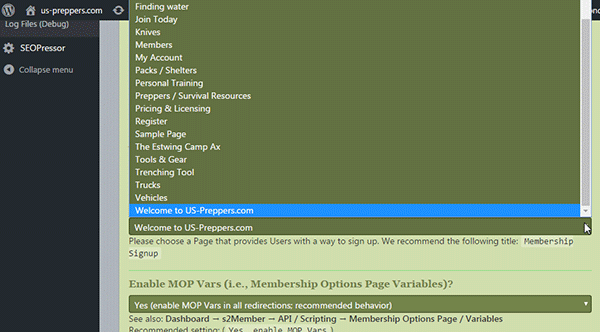
My site has a page (static page) that is designated in Wordpress as the “Front page”. The name & menu label of that page is " Welcome to US-Preppers.com" & “US-Preppers.com” respectively. This page as I noted here is set as the “Front page” as configured in Wordpress Dashboard "Settings > Reading > Front page displays >Front page > “Welcome to US-Preppers.com”.
Page level restrictions for this page is “0”

In /wp-Admin / Dashboard > Appearance > Menus > US-Preppers.com is configured as the first item in the main menu list i.e … “US-Preppers.com”, “Preppers/Survival Resources”, “Blogs / Reviews”, “The / Forum” etc…

In s2member I have a page, “Licensing & Pricing” set as the MOP “Membership Options page”.

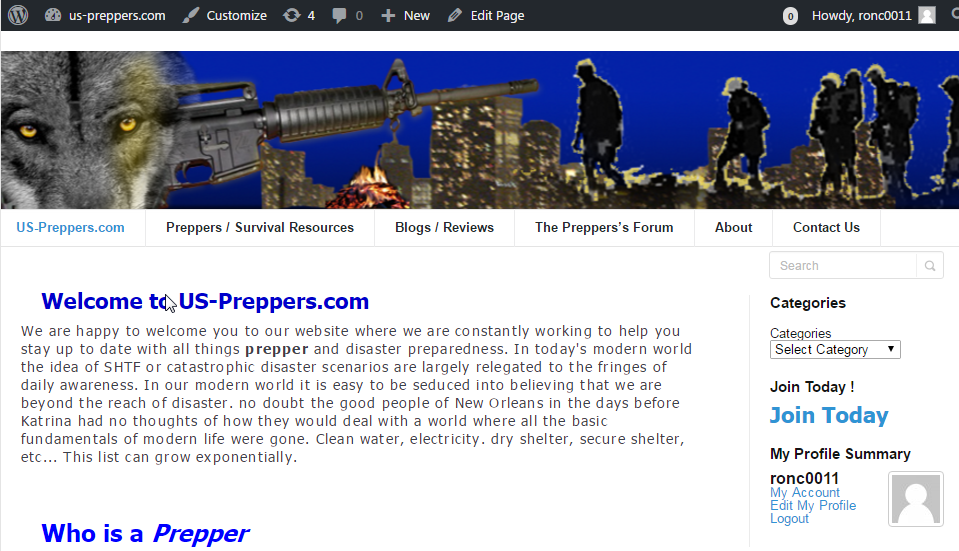
If I am logged in to the site my main menus shows me ““US-Preppers.com”, “Preppers/Survival Resources”, “Blogs / Reviews”, “The / Forum” etc… and http://localhost/us-preppers.com lands me on the “frontpage’ i.e " Welcome to US-Preppers.com” & “US-Preppers.com” I know that gets confusing but really its just the difference between the page name and menu label.
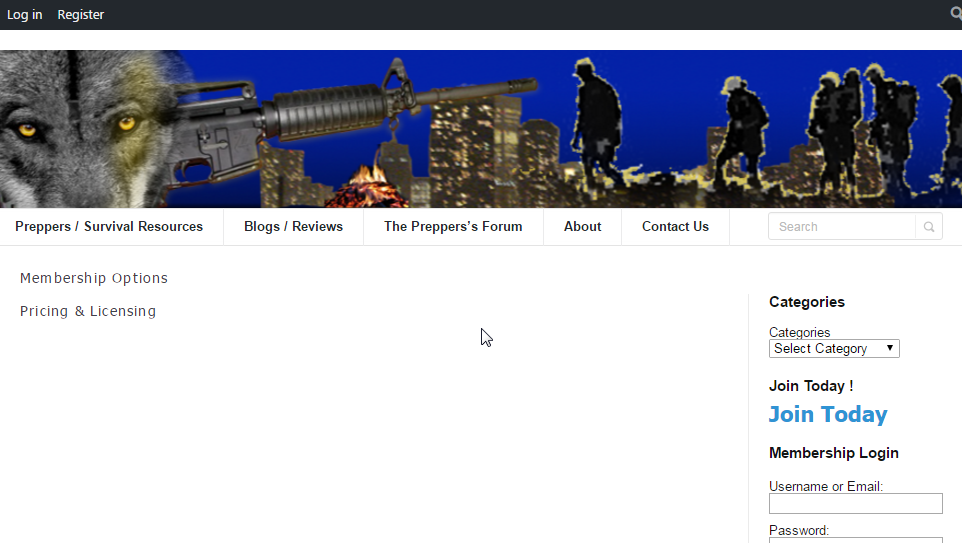
However, if I’m logged out (not logged in) my main menu shows me “Preppers/Survival Resources”, “Blogs / Reviews”, “The / Forum” etc… US-Preppers.com” has vanashed. And of course it takes me to “Licensing & Pricing” as would be expected. At present all pages in the site are set to default permissions, no Page Level Restrictions configured. Except apparently “US-Prerrers.com” which it seems I have set to level “0”. I’m guessing I must have set this while trying to get it to show as the “Front page” for the initial random, first time visitor.
Open Registration is set to “Yes(allow Open Registration, Free Subscriptions at Level #0)”
My 1st, #1 goal here is to always have “US_Preppers.com” appear in the main menu no matter what. Goal #2 is to have the random visitor or in fact any visitor land on “US-Preppers.com” i.e. the “Front page” initially. I want all login / Registration links or sign in options relegated to the sidebar & or top menu. Actually this “Top menu” may in fact be a product of my theme “Socrates 4” Though I think it’s a WP menu bar. It shows “Howdy, My-Username” on the right hand side. or if I’m not logged in it shows “Login” & “Register” on the left hand side and nothing else.

If I’m not logged in “localhost/usrpeppers.com” takes me to “Licensing & Pricing” and “US-Preppers.com” is absent from the main menu. I don’t want this to happen. I want my initial page to be US-Preppers.com ie “The Front page” as configured in Wordpress. & I want the menu item “US-Preppers.com” To be visible at all times and in its correct position as the 1st item in the menu as shown above. It is intended to be the “Home” or introductory page for the site. In other words; never, ever, ever, not be available in the main menu. I hope I’m not being vague or inarticulate here.

Oddly all the other pages where no page restrictions have been set are still accessible and they do appear in the menu.
I have tried to reset the s2member page restrictions in the “All Pages” edit area back to a no configuration condition but there is no such option available.

When all is said & done I want to be able to achieve the condition described above as Goal 1 & 2

Hopefully some screen shots may help

Logged In

Not Logged In

That’s as expected. By default, s2Member is protecting all your content, including menu items. But you can change this behavior. See this.

You can get much more fine-grained control by installing either the Nav Menu Roles or the Privileged Menu plugin from the WP repo. They both work really well with s2member.

This is a great example of why, when posting on a forum, it’s much better to explain precisely the problems you are seeing, rather than attempting to assert conclusions that might turn out not to be true. If you do the former, it’s much easier for someone else to help.

Thanks Tim. The “Alt View Restrictions” configuration looks to have been the solution. I’ll know more as I continue to customize my view. But off hand, initially it looks like it’s going to be the answer. at first go I turned everything off. I had set my “MOP” to the “Front page” configured in Wordpress i.e. my sites "Home page " (see below) to prevent s2member from making my registration page the “Front page” for the random, first time visitor.

So basically I think I’m half way there.

To be clear… a couple of screenshots…

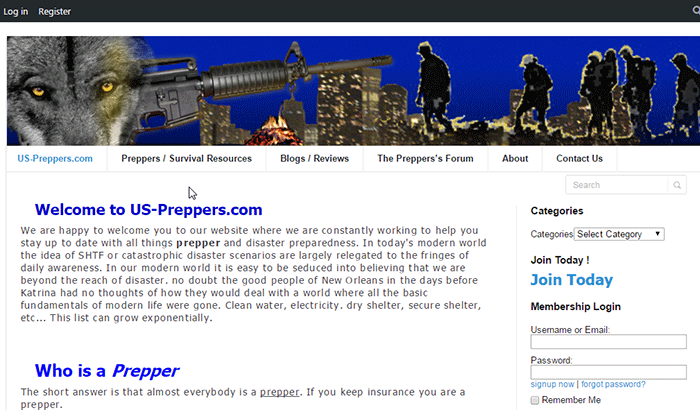
This is the view I want to be the initial page anyone sees immediately upon landing on “http://us-preppers.com”.

http://us-preppers.com/images/Logged-out_with_notes.png

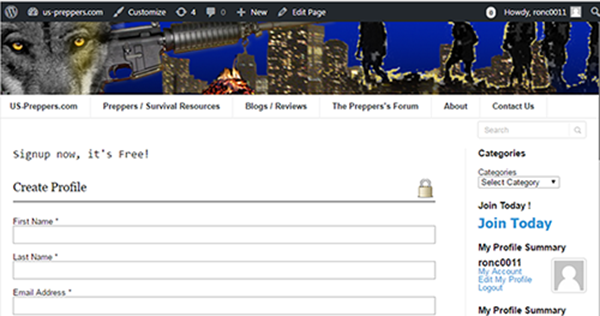
I’m thinking this is almost where I want to be. except of course I want the “register” link in the upper left corner to actually link to my “Licensing & Pricing” page where I will have a Free registration form and premium membership options ( “Squeeze” content / links).

This kinda brings me to another question regarding the “Front page” or “Home” page which is showing here just like I want it to for any visitor, member / non-member / logged-in / Not-logged-in, whatever…

I was only able to get this to actually work after assigning my desired “Front page” ( the one I designated in Wordpress “Settings > Reading > Front page displays> Front page” to be used as the MOP in s2member.

Off hand I don’t see that this has any real impact other than it directs the random, first time ( not-logged-in ) user to my intended “Home” page rather than a MOP or Join Now squeeze page. So I am curious if there is anything else I should be aware of regarding this default behavior of the “Membership Option Page” setup.

Is there anything that’s going to rear its head when I start configuring Buddypress as may be related to these issues I’ve been fighting with here.

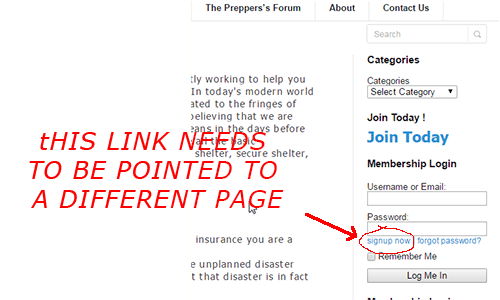
So… the actual question buried in this post is;… How do I configure the “Register” link in that upper Wordpress nav bar to actually take me to my MOP or “Licensing * Pricing” page. I short, I don’t see a way to connect it up. At present it doesn’t do anything.

I’m assuming that’s a Wordpress bar because when I’m logged in it shows “Howdy ‘my_username’” in the right hand side and the WP logo in the left hand side. Only after installing s2member did it start showing “login” & “Register” in the left hand side when not logged in

What I would do is disable the WP admin bar completely for my members. The Admin Bar Disabler plugin can do that for you.

Then I would create a new page for my home page, and copy the content that you want displayed there from the MOP that you already have. Now you can have whatever you want on the MOP (including keeping it precisely as it is, if you prefer). But you won’t confuse either yourself or your users if you keep the home page and the MOP as distinct entities.

it sounds like we are talking at cross purposes here or I’m not making my goal clear.

At present because s2member hijacks my "front page as designated in Wordpress Setting > Reading > … It has been necessary to configure my MOP to use my Wordpress “Front page”…

The problem this is causing is that the “signup now” link in the s2member login widget…

is also pointing to my “Front page” …

instead of pointing to the page that I want to use for signup & registration…

I really need for s2member to NOT hijack my “Front page” it’s either that or I guess I’m going to have to abandon s2member.

I can’t believe I’m 4 days in trying to resolve this issue.

I’m sorry, but you keep asserting stuff that isn’t true. Stick to the facts and avoid the speculation.

s2Member hijacks nothing. You can have whatever front page you like. It is you who has set the MOP as the front page. But it is absolutely not necessary to use your MOP as your front page, and it is certainly not recommended.

Just create a new page, and change the Front Page option in WP Settings to that page. Once you’ve done that, my previous post here explained what you need to do: copy the content that you want displayed there from the MOP that you already have.

First I’d like to say that your last message at lease gives me hope that there is a way t get this working and that the actual issue here is just a lack of understanding.

So, OK, I’ve made another attempt to illustrate the difficulty I’m having getting s2member to work the way I need it to work.

with that idea in mind I have created a video that I believe should make clear what I’m talking about when I say “Hijack” and frankly after making the video I am left with the unavoidable conclusion that “HijacK” is about appropriate a term as anyone would employ given the circumstances.

This video is only about 7:00 minutes long but hopefully it clearly illustrates what I’m trying to stop from happening.
http://us-preppers.com/images/fix-s2member.mp4

Sorry, but I’m not technical support. I am not watching a 7 minute video posted here by anyone, and certainly not by someone with so fixed a view as you. There are tens of thousands of s2Member and s2Member Pro, and no hijacking is involved.

OK, well I apologize if I am not the ideal seeker of help for software I’ve paid good money for.

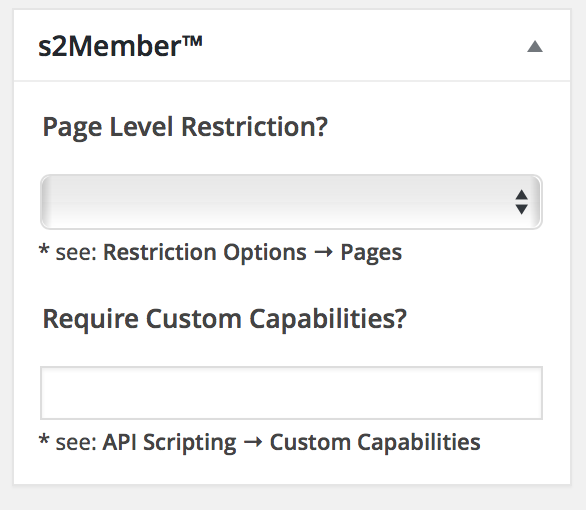
So any way, as it turns out no page is access restricted before that is set in the s2member widget on the Page edit screen i.e. level “0”, level"1" etc… Once it’s set there appears to be no way to unset it. Once that page has that token set wordpress, thanks to s2member is always going to redirect to the MOP.

this is a point that wasn’t made clear in the whole “copy & paste” advise. Thank you.

Anyway I think I finally did get it resolved. I sure hope I don’t find myself in need of any more help

Then you can open a support ticket. That’s not this forum.

You have set your frontpage to be only accessible with a level 0 or higher (yes, I watched your video), in other words, it is protected by s2Member.
In doing that, a visitor who is not logged in, will almost always end up at the MOP page. This is default behaviour of s2Member and is very powerful because it protects every page that has a level 0 or higher.
Setting you frontpage to no level at all (choose the upmost blank option in the s2Member dropdown on your page), makes it available to non logged-in visitors.

So, s2Member was not hijacking your frontpage, better yet, it was protecting it because you told s2Member to do so!

p.s.: Maybe a tip for Jason and his team, to give this blank option a name like ‘Not protected by s2Member’ or something like that. Maybe this makes it clearer for more users.