I have everything set up and on my register page but when I click the “add billing method - powered by Stripe” nothing happens. I am guessing there is supposed to be some sort of pop-up that lets me add my credit card.
What could be causing this?

I have everything set up and on my register page but when I click the “add billing method - powered by Stripe” nothing happens. I am guessing there is supposed to be some sort of pop-up that lets me add my credit card.
What could be causing this?
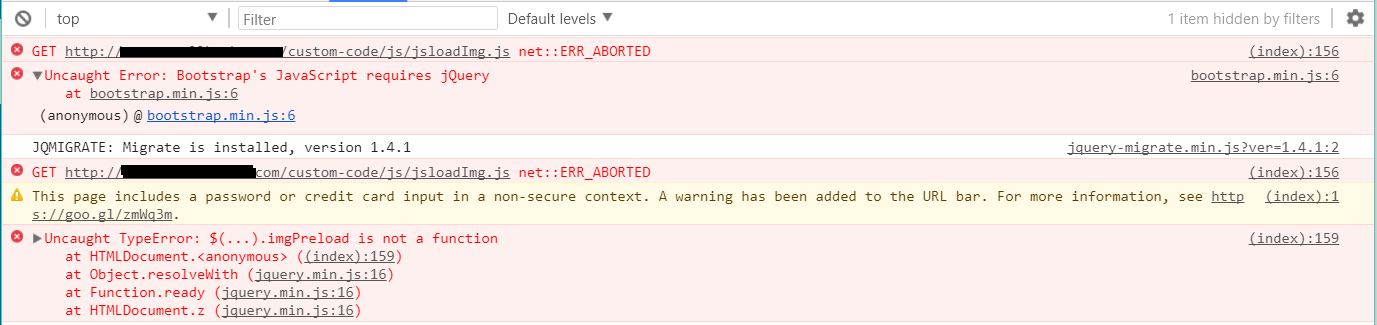
It sounds like a javascript issue. Right-click on the web page, select Inspect Element, then Console, and then refresh the page to see what errors are reported.
Well, there are two major problems there. The first is that jQuery isn’t loaded. Stripe won’t work without that, and neither will a ton of other stuff in WordPress. jQuery is bundled with WP, so you have got a plugin, theme, or some code that is stupidly deactivating it.
Secondly, you are trying to use Stripe on an insecure page. I hope that’s just for testing purposes. When you go live, the page must be on an https connection.
Ya, I’m just testing but getting https before I launch.
Any ideas on how I can try to figure out what is deactivating JQuery?
Thanks
None at all because I have no idea what theme or plugins you are using. Try changing themes and see what happens. If still no joy, deactivate all other plugins apart from s2Member. If it works then, turn them back on one by one and re-test to see why the problem recurs.
I figured it out, thanks for the help.
@KTS915, my button stopped working again and I can’t figure out why. The only thing I changed on my website is that it now has SSL.
I checked the console like I did previously and there are no errors.
Maybe you need to add some code to ensure that everything is redirected to https.
I thought that as well and looked at all the code and all URLs use https
Then I suggest investigating whether there is any caching going on that might cause this. Otherwise, it’s back to what I said before: