
Bugger. That’s not what I wanted to hear re: Enfold Theme.
Yes it is possible to create a new website, but that won’t really help as I am committed to using what I have in the Live Site.
Is there no way of identifying why the page redirection is not working and trying to address that?
If it is a Theme issue, and the cause can be identified, I can contact the Theme Developers and see if they can provide a fix.
Login Redirection not working, sends to Dashboard
There’s no way to identify a theme issue for anyone here unless s/he happens to have purchased the Enfold theme. You really should ask the theme’s developers.
The problem with big, all-purpose themes from Themeforest like Enfold is that they bundle so much stuff that they aren’t really designed to work with other plugins. They just basically take over, often trespassing into territory that better-coded themes would leave free for third-party plugins.
OK, well I think I will need to do as you suggested first.
I’ll create a new WordPress site, install S2 first and test it.
If it works, I’ll then install the Theme and test it again.
If it then breaks, I’ll contact the Theme Developers and see what they can offer.
I’ll get back with the result once I’ve done this.
Thanks for all your efforts thus far, much appreciated.
So I installed a whole new WordPress site in a test folder.
Installed the S2 Plugin and tested it.
Yes, worked as it should.
Installed Enfold Theme and Child Theme, activated Child Theme.
Yes, still directing me to the Welcome Page.
Now I will start adding plug-ins one by one 
OK, just installed the bbpress plugin and that broke it immediately.
Just updated Roles & Capabilities and it fixed it.
But doing the same thing on the Live website doesn’t
I just found an interesting side effect.
I don’t know if it’s relevant or not, but straight after I update Roles & Capabilities, log out and then try to log in again, I get the error:
You do not have sufficient permissions to access this page.
The url that is displayed is http://www.jetskifishingmob.com/wp-admin/admin.php?page=ws-plugin--s2member-gen-ops&loggedout=true
How did you update Roles and Capabilities?
Other Integrations -> Update Roles/Capabilities
Then what I’d suggest is installing the Capability Manager Enhanced plugin.
This will enable you (a) to compare what capabilities are assigned to which roles on your live and test sites, and (b) to add or subtract capabilities until you have them the way you want them.
OK, this is interesting.
The only difference I can see between the Website that works and the Website that doesn’t, is the one that doesn’t shows that editing of Posts is allowed.
And when I uncheck the box that allows it and I save it, it appears to save it, but when you check again, the box is checked again.
So in other words, it won’t save.
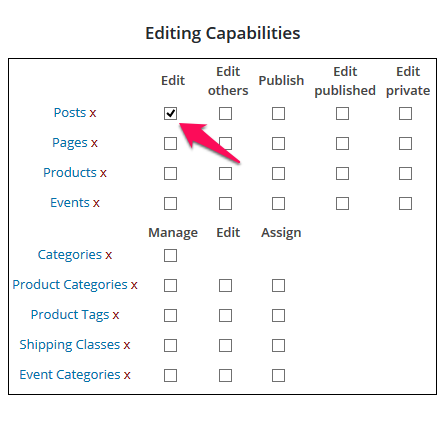
Well, Iain, at least you seem to have narrowed it down, and it isn’t your theme!
That looks like a corrupt installation. Could you try making a backup of your live site, just in case, and then cloning your test site to your live site?
There are issues with doing that.
Being a live site with eCommerce, it is constantly changing.
I am thinking that I may have to try and find where this is in the database and manually changing it.
I dunno, I’ll look into it
I am thinking that I may have to try and find where this is in the database and manually changing it.
Unfortunately, I don’t think it’s that straightforward. Capabilities are included in the wp_usermeta table – but on a per user basis!
WooHoo
I found the solution.
I deactivated all plug-ins except S2 and Capabilty Manager Enhanced.
I then unchecked the box and saved.
It stayed saved.
I then reactivated all plug-ins one by one until I found the one that was causing the issue.
It was a plug-in called WP User Avatar
Now it is all working as it should.
I am so relieved.
Thank you for all your time and effort Tim.
I wouldn’t have been able to resolve it without your help.
Oh, wow! That’s great! Thanks for letting me know, Iain. I’ll have a glass of wine to celebrate!